
In this exercise you will create a variation of an 1800 French textile design reproduced in Peter Phillips and Gillian Bunce, Repeat Patterns: A Manual for Designers, Artists and Architects, Thames and Hudson, 1993, London, p. 71. You can just as well create your own pattern.
1 Open the file FrenchTextile1800.ai, which accompanies this tutorial, or draw a few shapes yourself.

2 In the Layout list in the SymmetryWorks panel, click the Half-drop layout.
3 Select all objects in the artwork (for example, using Select All from the Edit menu) and click the Make button in the SymmetryWorks panel. The half-drop pattern appears. Depending on the size of your initial shapes, the neighboring units of repeat may overlap or be located too far away from each other. This can be adjusted by tweaking the size of the control path.
4 To locate the control path, make sure that the elements of the patterns are still selected and click the Select Control Path button in the SymmetryWorks panel.
5 Click the free-transform tool in the Illustrator toolbox and move one of the upper free-transform handles vertically up. Then similarly adjust the horizontal size of the control path by moving one of the handles on the right.
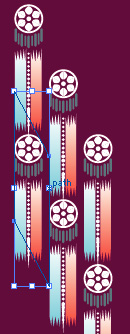
6 The half-drop pattern is ready. Increase the tiling size as needed.

In this exercise you will reproduce the 1925 French Art Deco design from Peter Phillips and Gillian Bunce, Repeat Patterns: A Manual for Designers, Artists and Architects, Thames and Hudson, 1993, London, p. 91. Alternatively you can work on a pattern of your choice.
1 Start from the motif in the file ArtDeco1925.ai, which accompanies this tutorial, or from any other motif.

2 Click Brick in the Layout list in the SymmetryWorks panel.
3 Select all objects in the artwork (for example, using Select All from the Edit menu) and click the Make button in the SymmetryWorks panel.
4 By default, SymmetryWorks makes the brick repeat with the 1/2 shift. To change the default to the 1/3 shift required for this pattern, double-click the SymmetryWorks tab several times until the optional part of the panel becomes visible (or choose Show Options from the pop-up menu in the SymmetryWorks panel). Then choose 1/3 from the Constrain Shift pop-up list.
5 Because the pattern looks congested with overlapping units of repetition, you need to increase the repeat size. Make sure that the pattern is still selected and click the Select Control Path button in the SymmetryWorks panel.
6 Click the free-transform tool in the toolbox and drag the upper-right free-transform handle along the diagonal to increase the size of the control path.
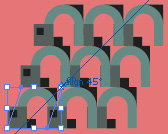
7 The horizontal shift is currently 1/3 of the length of the "brick", while, for this pattern, you need 2/3. Select the shear tool from the toolbox, click the upper side of the control path, and drag the mouse to the right. If you drag too short a distance, the control path snaps back to its current shape (1/3 shift); if too far, the straight repeat appears (3 shifts each of 1/3 of the length result in a shift equal to one full length). You want it to be in the middle (2/3 shift). Simply use the Undo command until you get it right.
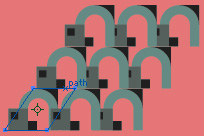
8 Now click the free-transform tool again and increase the horizontal size of the control path by dragging one of the right free-transform handles to the right. You want the dark-green rectangle to barely touch the light-green arch on the left.
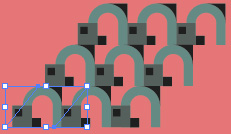
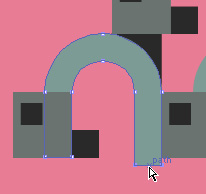
9 Your pattern is essentially ready. Add a final touch by moving the right base of the arch somewhat down to fill the small gap between the base and the top of the neighboring arch.
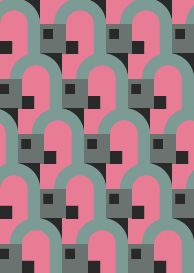
10 Here is the final pattern. Notice that the vertical repeat size is three times larger than the size of the motif.




 FrenchTextile1800.ai (324 KB)